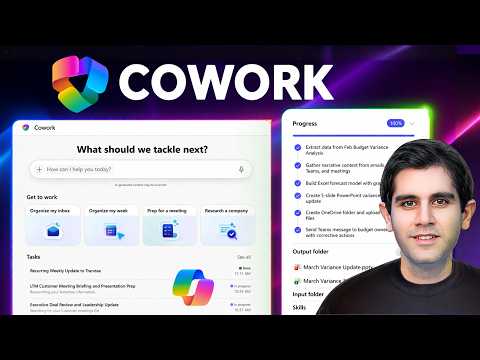
Copilot Cowork: Boost Team Productivity
Principal Program Manager at Microsoft Power CAT Team | Power Platform Content Creator
Microsoft expert: Copilot Cowork automates work across Outlook Excel Word PowerPoint SharePoint with AI for workflows
Key insights
Copilot Cowork is a new agent-style feature in Microsoft 365 that acts like a virtual coworker, not just a chat helper, by planning and carrying out multi-step work across apps.
Plan-to-action loop: you describe a result, Cowork creates a step-by-step plan, asks for confirmation, then executes tasks while you keep oversight; this loop uses Work IQ to stay context-aware.
It works across apps—Outlook, Excel, Word, PowerPoint, Teams and SharePoint—to do things like triage inboxes, analyze sheets, build decks, and extract contract details into documents.
Control and safety matter: Cowork shows previews and risk indicators, asks you to Approve actions, and lets you Pause/Resume/Cancel or give feedback at any time; it follows enterprise data protections.
Practical demos show real use cases—summarize email threads, build PowerPoint decks, improve resumes, and turn meeting transcripts into deliverables—so routine tasks finish faster.
Availability and benefits: launched in the Copilot Wave 3 Frontier program (April 2026), Cowork automates much busywork, frees time for higher-value work, and admins enable it from the Copilot app under Agents.
Overview
In a recent YouTube video, Reza Dorrani demonstrates Microsoft Copilot Cowork and shows how the new feature moves AI from chat to active task execution. The video walks viewers through real work scenarios so they can see planning, approval, and automated execution across apps. As a result, the presentation helps clarify where Copilot Cowork fits inside the wider Microsoft 365 productivity suite and how it differs from traditional assistant-style tools.
How Copilot Cowork Works
First, Dorrani explains that users describe an outcome and the system builds a plan that breaks the work into steps, then requests approval before acting. The agent uses contextual data from services like Outlook, Excel, Word, and PowerPoint to perform tasks such as drafting messages, scheduling events, or building documents. Moreover, the video highlights that the feature runs tasks in the background while letting users pause, steer, or cancel operations at any time.
Second, the demo emphasizes the role of Microsoft’s intelligence layer, known as Work IQ, which helps the agent reason over emails, meetings, and files. Consequently, Cowork can act more like a human coworker by linking related artifacts and keeping changes within the user’s organizational context. At the same time, Dorrani notes that Cowork seeks user confirmation for higher-risk actions to preserve control and reduce mistakes.
Real-World Demonstrations in the Video
Dorrani walks through several practical scenarios to make capabilities tangible, starting with inbox triage where messy threads become clear action items. He then shows calendar optimization that consolidates meetings and schedules daily briefings by combining emails and meeting notes into a single overview. Next, the video demonstrates data analysis in Excel that produces insights, followed by generating polished documents and slides in Word and PowerPoint from raw notes and transcripts.
The presenter also covers specialized tasks like extracting clauses from contracts and converting meeting transcripts into structured deliverables such as statements of work. These examples show how Cowork can move beyond single replies and handle multi-step workflows across multiple files and apps. As a result, viewers get a clear sense of how the tool stitches information together to complete outcomes rather than only offering suggestions.
Benefits and Tradeoffs
The video makes a strong case that automating routine work can free time for higher-value tasks, and Cowork’s cross-app access supports complex, connected workflows. However, there are tradeoffs: automation increases efficiency but also raises concerns about incorrect or incomplete outputs if prompts or context are ambiguous. Therefore, Dorrani stresses the importance of review and approval steps, which balance speed with human oversight and help reduce operational risk.
Moreover, while Cowork promises to save time by executing repeated tasks, it may require initial setup and training to behave predictably for a team’s processes. In other words, you gain consistency and scale, but you must invest effort to tune the agent’s behavior and guardrails. Consequently, organizations will need to weigh immediate productivity gains against the effort to align the agent with internal rules and workflows.
Challenges, Security, and Adoption
Dorrani touches on several challenges that organizations must address before broad adoption, including data access permissions, privacy, and the need for clear governance around automated actions. He also notes that admins must enable agent access and configure controls so that automated tasks respect enterprise data protection and compliance rules. In practice, achieving safe use requires both technical safeguards and clear policies about when the agent can act without additional approvals.
Finally, the video suggests that user trust will play a central role in adoption; therefore, Microsoft’s decision to include checkpoints and previews aims to build confidence. Meanwhile, teams should prepare for change management work, such as updating standard operating procedures and training staff to work with agentic automation. Ultimately, the promise of Copilot Cowork is significant, but realizing it will require careful planning to balance productivity, control, and security.

Keywords
Copilot Cowork, Copilot Cowork demo, Copilot for work, AI coworking assistant, Copilot productivity tools, AI collaboration platform, Copilot workflow automation, Copilot in action