Plaud Note Pro: Rethink AI Note-Taking
Modern Work Mentor, Change Consultant, Content Creator, Community Conduit.
Microsoft expert: Plaud Note Pro clear recording to AI notes with Azure Speech, Teams and OneNote for smarter meetings
Key insights
- Plaud Note Pro: A slim, dedicated AI recorder with four microphones, up to ~30 hours of battery (endurance mode up to ~50 hours), and automatic phone/in-person/desktop recording modes for meetings, interviews, and calls.
- Press to Highlight: A physical button that lets users mark important moments while speaking or listening, so the AI gives those moments extra weight when generating transcripts and summaries.
- Workflow: Record audio, upload to the Plaud app or web workspace, transcribe, identify speakers and highlights, then generate structured outputs like summaries, decisions, and action items.
- Transcription & speaker labels: Plaud supports automatic transcription in 112 languages and attempts speaker separation, but accuracy depends on accents, background noise, overlap, and recording quality.
- Templates & AI outputs: The system converts transcripts into tailored documents (meeting summaries, action lists, interview notes) using many templates and lets users ask follow-up questions about the conversation.
- Use cases & integration: Useful for conferences, team off-sites, interviews and phone calls; outputs can complement productivity tools like Microsoft Teams, Outlook, OneNote, and Word to streamline follow-up and decisions.
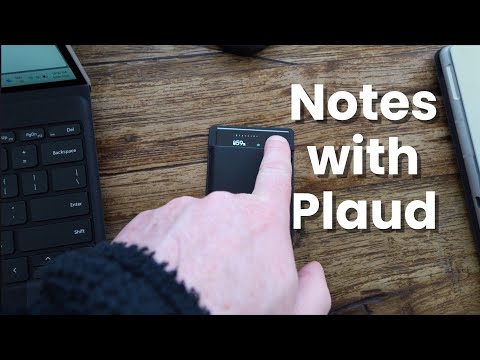
In a recent YouTube video, Darrell Webster Modern Work Mentor reviews the Plaud Note Pro, a dedicated AI recording device aimed at improving how professionals capture and summarise spoken conversations. After two months of hands-on use, Webster walks viewers through the product, its workflow, and practical scenarios such as conferences, interviews, and team off-sites. Furthermore, he timestamps the video to highlight key moments including product overview, audio tests, battery life, and final verdict. Consequently, the video serves as a practical report for anyone considering AI-assisted note taking in daily work.
Product Overview and Workflow
The Plaud Note Pro is a thin hardware recorder equipped with four microphones and dual recording modes for phone calls and in-person conversations. It claims extended battery life — up to thirty hours in normal mode and longer in endurance mode — and can transfer recordings to a mobile or web app for transcription and AI processing. Moreover, the system supports many languages and offers templates for outputs such as summaries, decisions, and follow-up items. Therefore, it positions itself as a bridge between raw audio and structured meeting notes.
Webster outlines the typical workflow: record, transfer audio, transcribe, label speakers, and generate summaries or action lists with AI assistance. He shows how the app separates speakers and applies templates to turn a transcript into usable documents that can feed into productivity tools. In addition, he highlights how the device can be used during phone calls, online meetings, and face-to-face conversations without frequent manual switching. As a result, the device aims to reduce friction between capturing ideas and turning them into tasks.
Key Feature: Press to Highlight
Perhaps the most distinctive feature is the physical Press to Highlight button, which allows users to mark important moments while they speak or listen. Webster argues that this human-guided flagging steers the AI to prioritise those moments when generating summaries, thereby improving relevance and actionability. Moreover, the approach changes the dynamic from post-hoc AI judgement to real-time human–AI alignment, which can bring better focus to decisions and questions that matter. Consequently, highlights can reduce time spent editing or searching through long transcripts.
However, the method implies a tradeoff: the system relies on the user to correctly identify importance as conversations unfold. If a user forgets to press the button or misjudges a moment, the summary may still miss what mattered. In contrast, fully automated systems might capture everything but still fail to surface the correct takeaways. Therefore, Webster’s experience suggests that the hybrid approach raises the bar on user engagement while promising more targeted outputs.
How the Technology Performs
The device combines multi-microphone audio capture, automatic transcription, speaker differentiation, and AI-driven summarisation templates. Webster tests audio quality in different positions and shows that performance depends heavily on distance, background noise, and overlapping voices. Moreover, while the platform advertises support for many languages, he points out that real-world transcription accuracy varies with accents and noisy environments. Thus, solid recordings remain essential for reliable AI output.
Webster also demonstrates the mobile app’s role during recording and post-processing, noting that the app helps label speakers and refine highlights before generating final summaries. He remarks that desktop recording for online meetings works but may require additional setup depending on conferencing tools. Consequently, integration into existing workflows is feasible but not automatic, and users must test connections and permissions. In this way, the device blends hardware and software capabilities rather than replacing either.
Use Cases, Tradeoffs, and Challenges
Webster explores practical scenarios: personal voice notes, conference recordings, interviews, and planning sessions at team off-sites. He shows that for one-to-one interviews or solo voice notes, the device can capture details quickly and turn them into structured outputs, which saves time later. However, in busy conference rooms or noisy events, the pickup range and ambient sound create limitations that require careful positioning. Therefore, users must balance convenience against the need for clear audio capture.
Other tradeoffs include privacy and data control, because recorded conversations are transferred to a cloud service for transcription and AI processing. Webster stresses that organisations must weigh convenience against compliance and storage policies. In addition, the device’s physical nature is both a strength and a weakness: it simplifies recording but introduces cost, the need to carry hardware, and potential loss or battery concerns. Consequently, teams should test the device in real situations before broad adoption.
Final Verdict
Overall, Webster finds the Plaud Note Pro compelling for users who want more human-guided AI summaries rather than fully automated outputs that may miss key decisions. He praises the Press to Highlight concept and the structured templates that turn conversations into action items, while also warning about audio limitations and the need for deliberate use. Moreover, he notes that Microsoft users can integrate the resulting notes into apps like Teams, Outlook, and OneNote to support existing workflows, though integration may require extra steps.
In sum, the device represents a thoughtful attempt to balance automation with human intent, delivering clear benefits when users commit to capturing highlights and ensuring good audio. Yet, tradeoffs around privacy, setup, and accuracy remain, and teams should consider those factors before adopting such hardware. Ultimately, Webster’s hands-on review offers a practical lens for organisations deciding whether a dedicated AI recorder fits their productivity needs.

Keywords
Plaud Note Pro review, Plaud Note Pro AI note taking, best AI note taking apps, Plaud Note Pro features, Plaud Note Pro vs other apps, AI note taking productivity tips, can Plaud Note Pro change my note taking, Plaud Note Pro privacy and security