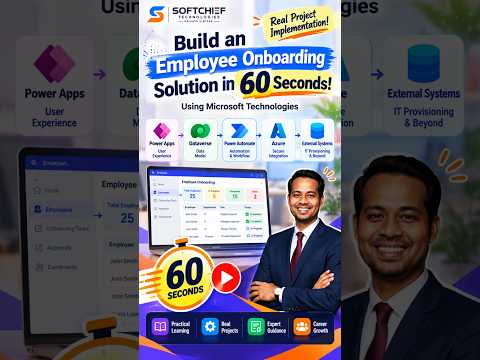
Power Apps: 60-Second Onboarding App
Learn how to take advantage of your business data with Microsoft Dynamics 365 & Power Platform & Cross Technologies. My name is Sanjaya Prakash Pradhan and I am a Microsoft Certified Trainer (MCT) and
Streamline employee onboarding with Microsoft Power Apps, Dataverse, Power Automate, Azure Functions & API Management
Key insights
- Solution overview: Build an automated employee onboarding hub using Power Apps, Microsoft Dataverse, Power Automate and Azure Functions/API Management.
The "60 seconds" demo shows the concept quickly, but a full deployment needs configuration and testing. - Typical workflow: A new-hire event or form triggers a flow that creates an onboarding case in Dataverse, assigns tasks, routes approvals, and tracks progress to completion.
The flow can also request equipment, assign licenses, and notify managers. - Dataverse role: Store structured data in tables like Employees, Onboarding cases, Tasks, Approvals and Documents.
Dataverse provides relationships, security roles, auditing and a shared data layer for apps and flows. - Power Apps front end: Build HR, manager and new-hire interfaces with Power Apps.
Choose canvas apps for custom UI or model-driven apps when you center the solution on Dataverse tables and business processes. - Automation and integrations: Use Power Automate to trigger processes, send notifications, escalate tasks and call external systems.
Use Azure Functions and Azure API Management for secure IT provisioning and include error handling like retries, duplicate checks and failure logging. - Production guidance: Treat the demo as a prototype; plan security, testing and governance before rollout.
Add dashboards and Microsoft Teams integration for tracking, and consider Copilot Studio for conversational help and guided tasks.
Video Summary
In a brisk 60-second walkthrough, Softchief Learn demonstrates how to assemble an employee onboarding solution using Microsoft technologies. The video stitches together a practical concept that combines Power Apps, Microsoft Dataverse, Power Automate and Azure services to create a single, automated onboarding flow. Rather than a full production rollout, the clip functions as a rapid demonstration that shows how the pieces relate and where teams must focus next.
The presenter highlights how a new hire event can trigger an automated workflow that provisions accounts, assigns tasks and reports progress. In addition, the video calls out the need for error handling and monitoring so that automated steps remain reliable. Consequently, viewers get both a conceptual map and a sense of practical next steps that extend beyond the minute-long demo.
Core Components and Roles
The video explains each tool’s role clearly, beginning with a user-facing interface in Power Apps for HR, managers and new employees. Next, Dataverse serves as the governed data layer where employee records, tasks, approvals and status history live. Then, Power Automate orchestrates notifications, approvals and condition-based actions so that the process flows without constant manual intervention.
For secure integrations with external IT systems, the walkthrough introduces Azure API Management and Azure Functions to run provisioning scripts and custom APIs. Furthermore, the video points out that teams can present onboarding status through dashboards or integrate notifications into collaboration tools. Thus, the architecture aims to balance a low-code front end with scalable, code-driven backend integrations.
How the Workflow Operates
According to the demo, the flow begins when an HR or HCM event creates a Dataverse onboarding case that seeds tasks for HR, IT and managers. Subsequently, Power Automate generates checklist items, routes approvals and triggers provisioning steps as approvals arrive. The process then assigns licenses, requests equipment and updates status fields to maintain an audit trail for compliance and reporting.
Moreover, the video highlights retries, duplicate prevention and failure tracking as essential operational behaviors that keep the process resilient. It also shows how a final completion summary gives stakeholders a clear signal that onboarding is complete. As a result, organizations can move from disconnected spreadsheets and emails to a governed, traceable workflow that supports scale.
Tradeoffs and Implementation Challenges
Softchief Learn notes important tradeoffs between speed and production readiness: while the demo proves concept quickly, a real deployment requires data modeling, security configuration and governance. For example, a simple prototype may rely on built-in connectors, but an enterprise-grade solution often needs custom APIs and stricter identity controls. Therefore, teams must balance rapid iteration against the time needed for secure integrations and rigorous testing.
Additionally, the video touches on operational challenges such as handling tenant limits, licensing costs and connector throttling. Using Azure Functions and API Management adds flexibility but also increases operational overhead for monitoring and scaling. Finally, introducing AI features like conversational agents can improve user experience but requires extra work on data privacy, prompt governance and cost control.
Practical Advice and Next Steps
Softchief Learn recommends starting with a clear data model in Dataverse and mapping required approvals and tasks before building the front end. Then, teams should use Power Automate to codify business rules and include observability so failures are surfaced quickly. In addition, implementing unique keys and idempotent patterns helps avoid duplicate provisioning when automation retries occur.
For organizations ready to move from demo to production, the video advises investing time in security roles, environment strategy and testing pipelines. Moreover, implementing monitoring dashboards and a playbook for common failures makes operations predictable and reduces time-to-recovery. In short, the demo acts as a practical primer, but production success depends on planning for scale, security and ongoing maintenance.
Conclusion
Softchief Learn’s short video offers a compact, useful demonstration of how Microsoft tools can form an integrated onboarding solution. It combines a visual overview with concrete pointers about automation, integration and monitoring so that technical teams can understand the architecture quickly. While the 60-second format cannot replace detailed design work, it serves as an effective launch pad for teams that want to build a governed, automated onboarding process using Microsoft technologies.

Keywords
Power Apps employee onboarding, Dataverse onboarding solution, Azure employee onboarding solution, employee onboarding automation, rapid onboarding with Power Apps, Power Automate Dataverse onboarding, Microsoft Power Platform HR onboarding, build onboarding in 60 seconds