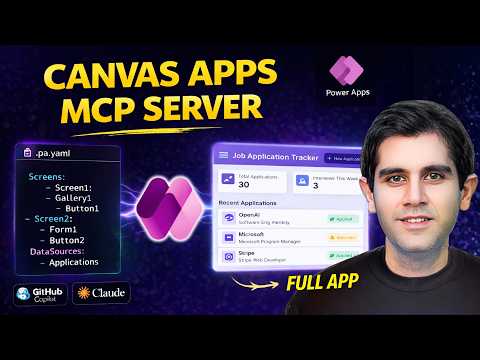
Power Apps: Build Canvas Apps Faster
Principal Program Manager at Microsoft Power CAT Team | Power Platform Content Creator
Microsoft expert: Speed Canvas Apps with Power Apps MCP Server, Power Platform, AI GitHub Copilot and Claude Code
Key insights
- Power Apps MCP Server — A local bridge that lets AI tools (like Copilot or Claude Code) talk directly with Power Apps Studio.
It uses the open Model Context Protocol (MCP) so models can list controls, inspect data sources, and push changes safely. - Simple setup and workflow — Install the canvas plugin, enable coauthoring in Studio, and run the configure command or describe your app to connect.
The AI asks clarifying questions, generates screen files, and syncs changes to your live session for immediate preview. - YAML app structure — AI creates and updates app definitions as .pa.yaml files that represent screens, controls, and formulas.
The server validates and auto-fixes YAML so generated code meets canvas app rules before it goes live. - AI-assisted, not replacement — The tools reduce repetitive UI and formula tasks while you retain control and review changes.
Human-in-the-loop oversight keeps quality, compliance, and design intent intact. - Agents and automation — Add the MCP Server to Copilot Studio agents to automate data entry, file parsing, and CRUD operations.
Agents can run with maker-provided credentials and show actions in an enhanced feed for easy review. - Practical benefits and example — Expect faster prototyping, fewer manual errors, and easier scaling across teams.
Example use: building or updating a Job Application Tracker quickly with AI-generated screens and data flows.
Overview of the Video
In a recent YouTube video, Reza Dorrani introduces a new workflow for building canvas apps using the Power Apps MCP Server. He frames the approach as a way to speed up routine work by pairing low-code development with AI-assisted tools such as GitHub Copilot CLI and Claude Code. Moreover, he stresses that this method supports developer control rather than replacing developers, and he shows how AI can generate and sync YAML-based app definitions directly into Power Apps Studio.
Reza outlines a hands-on demo that includes a practical example, the Job Application Tracker app, to illustrate real-world usage. He walks viewers through setup, how the MCP Server connects AI tools to a live coauthoring session, and how the workflow produces .pa.yaml files that the studio accepts and validates. This summary highlights his main points and evaluates tradeoffs and challenges so readers can decide whether to try the approach.
How the MCP Server Works
The video explains that the Model Context Protocol (MCP) acts as a bridge between large language models and Power Apps Studio. Consequently, AI tools can query available controls, data sources, and app state, and then generate or update app screens as YAML files. Reza shows how installing a canvas apps plugin and enabling coauthoring lets the AI ask clarifying questions, produce YAML for screens, and sync changes to a live preview for immediate feedback.
Additionally, the MCP Server can extract environment details such as environment ID, app ID, and cluster from the studio URL so the AI has context for accurate changes. As a result, AI-generated files are validated against canvas app standards before pushing updates, which helps reduce common errors. This flow creates a tighter loop between idea, code generation, and validation.
Demonstration and Real-World Example
Reza demonstrates a step-by-step build of the Job Application Tracker app to show practical benefits. Initially, he answers a few questions about business needs, UI preferences, and data sources, and then the AI creates the screen YAML and wiring for controls. The live sync reveals how small iterations become fast: the AI can auto-fix formulas, wire data connectors, and present a working preview within minutes rather than hours.
He also shows updating existing apps with the same tools, which highlights the server’s ability to patch specific screens or replace repetitive UI tasks. While the demo is persuasive, he notes that real projects will still require design judgment, testing, and human review to ensure functional and UX quality. Thus, the hands-on example demonstrates speed and the need for careful supervision.
Benefits and Tradeoffs
One clear benefit is accelerated development: teams can prototype and iterate faster because AI handles repetitive UI and formula work. Furthermore, this approach can reduce manual data-entry automation through agentic workflows that extract information from emails or documents and create Dataverse records automatically. However, speeding up development comes with tradeoffs, including potential dependency on AI-generated structure and the need to keep human oversight in place.
In addition, integration benefits span collaboration and scalability: agents can be embedded into existing apps across Microsoft 365 and Teams, which broadens adoption without full rebuilds. Nevertheless, teams must balance speed with maintainability; YAML files and auto-generated code may require organization-specific standards, version control, and CI/CD processes to avoid drift. Therefore, the faster workflow demands stronger governance and disciplined engineering practices.
Challenges and Considerations
Reza addresses several challenges that makers and developers should expect when using the MCP Server pattern. First, AI tools may produce plausible but incorrect formulas, so validation and testing remain essential to catch logic errors and edge cases. Second, governance and security matter: configuring agents and granting maker credentials needs policies to prevent unintended data access or automation errors.
Moreover, there are practical limits: complex business rules, advanced UX needs, or custom controls may still require manual coding and design work. Teams must also consider performance implications when agents perform large-scale CRUD operations, and they should plan for versioning and rollback strategies. Ultimately, this approach offers powerful gains in productivity if organizations accept the tradeoffs and put proper review, testing, and governance in place.
Conclusion
Reza Dorrani’s video presents the Power Apps MCP Server as a practical bridge between AI tools and low-code canvas app development. It demonstrates that, with coauthoring and YAML-based syncing, makers can speed up routine tasks while retaining control and oversight. As a result, organizations can prototype faster and automate repetitive workflows, provided they address governance, validation, and maintainability concerns.
In short, this method is best seen as an augmentation rather than a replacement of developer skills: it reduces friction for common tasks while still requiring human judgment for quality and security. Therefore, teams should pilot the approach, assess tradeoffs, and evolve processes to combine AI speed with strong engineering practices.
Keywords
Power Apps Canvas Apps,Canvas Apps tutorial,Power Apps MCP Server,Build Canvas Apps,Canvas App development,Low-code Power Apps,Canvas Apps best practices,Power Apps deployment server