- All of Microsoft
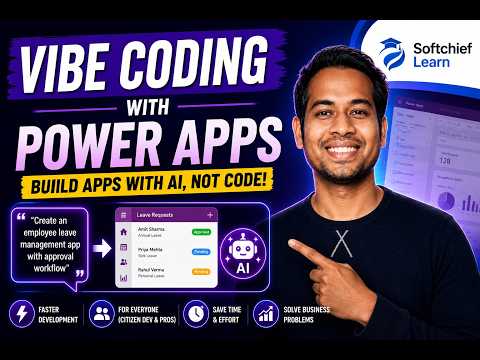
Power Apps: Build AI Apps Without Code
Learn how to take advantage of your business data with Microsoft Dynamics 365 & Power Platform & Cross Technologies. My name is Sanjaya Prakash Pradhan and I am a Microsoft Certified Trainer (MCT) and
Build AI-powered business apps with Microsoft Power Apps and Copilot on Power Platform and Dataverse, no code
Key insights
- Vibe Coding: A new AI-native preview experience in Microsoft Power Apps that builds a plan, data model, and working app from a plain-language description.
It aims to turn ideas into prototypes quickly without manual screen-by-screen assembly. - How it works: Describe the app in natural language, the agent asks clarifying questions, then Power Apps generates a Plan, creates the Data model, and builds the App for you.
You can review, edit, and iterate inside the same workspace and use voice dictation while prompting. - Key benefits: Speeds prototype creation and lowers the barrier for makers by producing full-stack drafts in minutes.
It provides a single workspace for planning, data, and app creation and offers AI-assisted requirements gathering and code generation. - Limitations: The feature is in preview and not yet production-ready; current scope is limited to the US region and English, and publishing is Dataverse-only in the preview.
Expect limited ALM support and no seamless cross-environment migration for AI-generated logic. - Who benefits: Ideal for Citizen Developers, Power Platform makers, business analysts, and developers who want fast prototypes or first drafts of app structure and logic.
Use it to accelerate design and hand off refined solutions to engineering teams for production hardening. - Best practices: Write clear, specific prompts and answer the agent’s follow-ups to improve results.
Iterate inside the unified workspace, plan ALM and governance before production, and treat generated apps as prototypes to be reviewed and hardened.
Overview of the video
The YouTube video from Softchief Learn introduces Vibe Coding in Power Apps, a new preview experience that uses AI to turn natural language descriptions into functioning app prototypes. The presenter, Sanjay Prakash, demonstrates how makers can describe requirements and let the system generate plans, data models, screens, and business logic. As a result, the session shows how rapid prototyping can shift from manual assembly to conversational design. Consequently, the video frames the experience as a productivity boost for a wide range of users.
How Vibe Coding works
First, the system asks the creator to enter a natural language prompt about the desired app, and then an AI agent may ask clarifying questions before generating a structured plan. Next, the workspace moves between Plan, Data, and App while preserving context so users can iterate without leaving the environment. Moreover, the AI can propose a data model and scaffold screens and logic, enabling a working prototype in minutes. Thus, the demo highlights the unified workspace as a key design change compared with prior canvas or model-driven starts.
Benefits and practical tradeoffs
The main advantage emphasized in the video is speed: builders can go from idea to prototype much faster, which lowers the barrier for business users and citizen developers. In addition, the AI-assisted flow helps gather requirements and generate initial data schemas, saving time during early discovery and iteration. However, the presenter also notes important tradeoffs, such as the preview focus on prototyping rather than mature production workflows and the current restriction to publishing to Dataverse. Therefore, teams should weigh the benefit of rapid iteration against the need for robust ALM, portability, and long-term maintainability.
Limitations and challenges
Softchief Learn and other community reports point out that the feature remains a preview and is not yet production-ready, which introduces governance and migration concerns for enterprises. Furthermore, current restrictions—like regional and language availability—limit broad adoption and testing in diverse environments. Meanwhile, the auto-generated logic may not include the advanced extensibility, performance tuning, or integration patterns that experienced developers require. Consequently, organizations should treat these outputs as strong starting points rather than final, deployable artifacts.
Who benefits and how to approach adoption
The video targets a mix of audiences: business users who need fast prototypes, Power Platform makers who want to accelerate solution design, and developers who prefer AI help for first drafts. Therefore, teams can use Vibe Coding to validate business ideas quickly, to align stakeholders around a working model, and to reduce the time spent on low-level scaffolding. Nevertheless, successful adoption requires pairing prototype outputs with formal review, code handover, and ALM practices to address security, governance, and compliance needs. In short, the best approach is to combine Vibe Coding’s speed with disciplined engineering practices.
Key takeaways and future outlook
The video closes with practical tips for prompting the system and for iterating on AI-generated apps, and it reminds viewers that voice dictation and follow-up prompts can improve results. Additionally, the presenter encourages users to treat the capability as a way to accelerate discovery while keeping a plan for migration, testing, and production hardening. Looking ahead, the unified agent-driven experience hints at broader platform directions that combine apps and agents under a managed Power Platform stack. Ultimately, teams that balance rapid innovation with governance will gain the most from this emerging capability.
- Author: Softchief Learn
- Presenter: Sanjay Prakash, Microsoft MVP - Business Applications
- Focus: AI-assisted Vibe Coding in Power Apps for rapid prototyping
In conclusion, the video presents a clear, accessible introduction to AI-first app prototyping in Power Apps while also acknowledging real-world limits. Moreover, it offers a pragmatic message: use the tool to accelerate design and validation, but plan for governance, migration, and engineering review when moving beyond prototypes. Consequently, readers and teams should experiment with Vibe Coding, document gaps, and combine the results with established ALM and security practices. By doing so, organizations can take advantage of faster iteration without compromising long-term reliability.
Keywords
power apps ai, build apps without coding, no-code ai apps, ai-powered power apps, low-code app builder, vibe coding power apps, no-code app development, microsoft power apps tutorial