- All of Microsoft
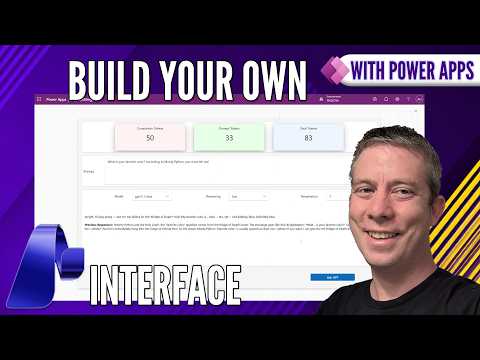
Power Apps: AI Interfaces with Foundry
Currently I am sharing my knowledge with the Power Platform, with PowerApps and Power Automate. With over 8 years of experience, I have been learning SharePoint and SharePoint Online
Build custom Microsoft Foundry connector in Power Apps with Azure AI for dynamic model switching, prompts and AB testing
Key insights
- Microsoft Foundry + Power Apps: The video shows how to embed Foundry models directly inside Power Apps to build AI interfaces that run inside your apps.
It demonstrates a hands-on example rather than just theory, so makers can follow the same steps in their environments. - Custom Foundry Connector: Start by creating a custom connector to call Foundry from Power Apps.
The demo covers authorization, the connector body, and the formula needed to call the connector from a canvas app. - Dynamic Model Switching: The app sets the model as a variable so you can switch models on the fly and run A/B tests.
This lets you compare prompt tokens and responses without redeploying the app. - Prompt Types and JSON Object: The sample app sends prompts as User, System, or Assistant roles and builds a JSON payload for the call.
It also shows how to add extra parameters and notes unsupported fields like TopP for certain connectors. - Agent Feed and UI/UX details: The tutorial walks through keeping previous responses, refining the UI, and polishing final touches for a smooth user experience.
It highlights practical steps like drop-downs for parameters and saving conversation context. - Bring Your Own Model (BYOM) and enterprise benefits: Foundry lets teams use custom or third-party models, fine-tune with company data, and connect to enterprise systems.
Features such as Generative Pages and built-in connectors speed development and help integrate AI into real business workflows.
Introduction: Video Overview and Context
The YouTube video by Andrew Hess - MySPQuestions walks viewers through building a custom AI interface inside Power Apps using Microsoft Foundry. In clear, step-by-step segments the author shows how to create a custom connector, wire it into a canvas app, and let users switch models and parameters on the fly. Consequently, the demo targets Power Platform developers, makers, and anyone interested in embedding large language model capabilities into business apps. The video also includes a chaptered timeline that helps viewers jump to key moments like authorization, JSON handling, and UI refinements.
Creating the Custom Connector
First, Hess demonstrates how to construct a Custom Foundry Connector rather than relying on the out-of-the-box Azure connector, which gives developers greater flexibility. He walks through the connector body and authorization flow, and then shows the formula used inside Power Apps to call the connector, explaining the JSON object used to pass prompts and parameters. By showing the connector body and the Fx formula, the video makes technical steps approachable for makers who already know the Power Apps environment.
Dynamic Model Control and Prompting
Next, the author focuses on dynamic model selection and prompt control to enable rapid experimentation. He creates dropdowns for model selection, sets the selected model to a variable, and demonstrates how prompts can be marked as user, system, or assistant messages to control behavior. This approach allows A/B testing of models and prompt variations, which helps teams compare outputs and token usage in real time. Therefore, developers gain a practical way to iterate on model choice and prompt design without redeploying connectors.
UI/UX and Parameter Management
Hess emphasizes that a responsive UI is essential when integrating LLMs into business apps, so he spends significant time refining the canvas app’s interface. He adds controls for parameters and shows how to preserve previous responses so users can compare results side by side, which improves usability for review and decision-making. He also demonstrates adding extra parameters and notes that certain settings like TopP may be unsupported in specific models, requiring careful handling in the connector logic. Consequently, designers must balance simplicity for end users with enough controls for power users to tune outputs.
Tradeoffs and Practical Challenges
The video candidly addresses tradeoffs between flexibility, cost, and complexity when integrating AI into apps. For example, allowing users to switch models dynamically increases experimentation power, but it can raise token and compute costs and complicate governance. Similarly, exposing many parameters improves control but risks confusing nontechnical users and increases surface area for misconfiguration. Therefore, teams must weigh the benefit of fine-grained control against the need for predictable costs and consistent behavior.
Operational Considerations and Best Practices
From an operational standpoint, Hess highlights the need for proper authorization and observability when calling models from production apps. He shows how to handle authentication inside the connector, and he explains how to structure the JSON payload so logs and telemetry remain useful for troubleshooting. Moreover, the video points out that keeping previous responses and enabling easy model switching helps with auditing and user trust, since human reviewers can see agent behavior over time. Thus, adopting disciplined logging and access controls is crucial for enterprise deployments.
Balancing Speed, Accuracy, and Cost
Hess’ approach illustrates the constant balancing act between response speed, output quality, and cost. While more powerful models may produce higher-quality responses, they often incur greater latency and expense, which matters in high-volume apps. Conversely, lighter models cost less but may require more prompt engineering to reach acceptable accuracy. Consequently, the ability to A/B test models and parameters in-app becomes invaluable when teams aim to find the best mix of performance and cost for their specific scenarios.
Developer Experience and Extensibility
The video also showcases how this pattern extends to broader development workflows by reusing connectors, variables, and UI components across apps. Hess demonstrates practical techniques such as storing models in variables, assembling JSON objects dynamically, and updating the UI as parameters change, which promotes maintainability. These methods make it easier to iterate and scale AI features across multiple Power Apps projects while keeping the integration modular. Therefore, developers can adopt the pattern as a repeatable foundation for future AI-driven experiences.
Limitations and Things to Watch
Despite the promising demo, viewers should note limitations that the video mentions, including unsupported parameters and model-specific behaviors that can break assumptions. Additionally, governance, data residency, and compliance remain important concerns when sending enterprise data to external models, even when using managed Foundry resources. The video encourages testing and careful configuration to avoid surprises in production and suggests maintaining fallbacks when certain model parameters are unavailable. Consequently, making conservative choices and thorough testing are essential steps.
Conclusion and Next Steps
In summary, Andrew Hess - MySPQuestions provides a hands-on guide for embedding Microsoft Foundry models directly into Power Apps via a custom connector, with clear demonstrations of dynamic model switching, prompt control, and UI improvements. The video balances practical how-to instruction with discussion of tradeoffs around cost, user experience, and operational risk, making it useful for both developers and decision makers. For teams planning to adopt LLMs in business workflows, the demo offers a solid starting point and a repeatable pattern for experimentation and production readiness. Overall, the tutorial equips makers to build more capable and adaptable AI-driven apps while staying mindful of real-world constraints.

Keywords
Build AI interface Power Apps, Power Apps Microsoft Foundry, AI in Power Apps tutorial, Create AI agents Power Apps, Power Platform Foundry integration, Low-code AI Power Apps, Conversational AI Power Apps, Power Apps AI builder guide