- All of Microsoft
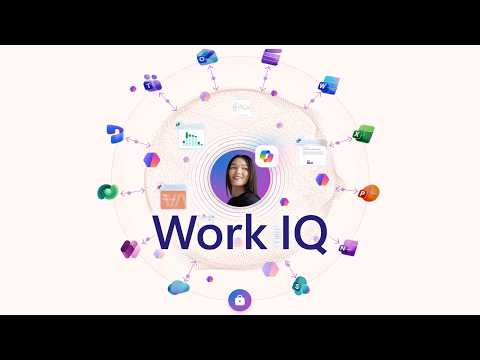
Work IQ: Copilot, Data & Agent Skills
Software Development Redmond, Washington
Microsoft Work IQ grounds Copilot in SharePoint OneDrive Teams Outlook and Word with connectors API and ServiceNow agents
Key insights
- Work IQ: Serves as the core intelligence layer that grounds Microsoft 365 Copilot and custom agents in real work data.
It links files, emails, meetings, chats, and business systems to provide accurate, context-aware AI responses. - Data Layer: Indexes structured and unstructured content from SharePoint, OneDrive, Teams, Outlook, and Dataverse so Copilot can find relevant facts fast.
Semantic search connects related items (for example, a Teams discussion to a contract or inventory record). - Context Layer (Memory): Learns collaboration patterns, priorities, and user preferences to personalize answers over time.
This memory helps Copilot prioritize recent or high-impact signals when answering queries. - Skills/Tools Layer (Inference): Provides agentic skills for actions like scheduling, summarizing, and retrieving archived content, exposed through the Model Context Protocol (MCP).
Pre-built skills and custom connectors let Copilot run multi-step workflows that create files, schedule meetings, and send updates from one prompt. - Activation & Data Grounding: Users enable the Work toggle in Copilot Chat or apps to activate full Work IQ capabilities and semantic grounding.
Copilot drafts documents that preserve sensitivity labels, resolves calendar conflicts, and answers queries using grounded organizational data. - Extensibility & Security: Administrators extend Work IQ via admin-center connectors, the Work IQ CLI, MCP servers, and developer APIs to integrate CRMs, ServiceNow, or custom systems.
Built-in governance and sensitivity-label handling keep responses compliant with organization policies.
The Microsoft-produced YouTube video presented by Jeremy Chapman outlines how Work IQ serves as a single grounding layer for Microsoft 365 Copilot and custom agents. In the video, Chapman demonstrates how the system pulls data from sources such as SharePoint, OneDrive, Teams, email, and meetings to give Copilot real work context. He also shows multi-step workflows, sensitivity label handling in Word drafts, and how calendar conflicts resolve in Outlook, all of which aim to make AI responses accurate and actionable. Overall, the video positions Work IQ as a way to shorten the gap between AI suggestions and the real facts of an organization.
What Work IQ Does
First, the video explains that Work IQ combines data, context, and tools into a unified knowledge layer. It indexes and semantically links content across Microsoft 365 so that Copilot can answer questions with real, relevant work artifacts rather than generic language-model guesses. For example, it can pull meeting transcripts or document text to ground a summary or fetch emails that affect a task, which helps reduce errors and misinterpretation. As a result, outputs become more reliable for day-to-day business decisions.
Second, Chapman highlights the three conceptual layers: the Data layer, the Context or memory layer, and the Skills/Tools inference layer. The Data layer aggregates structured and unstructured content, while the Context layer builds evolving understanding of collaboration patterns and priorities. Meanwhile, the Skills/Tools layer exposes specific actions, such as scheduling or query skills, through protocols like MCP. Together, these layers let Copilot act both as a knowledge source and an agent that can perform tasks.
How It Integrates and Extends
Importantly, the video shows that Work IQ does not stay inside Microsoft silos. Chapman demonstrates connectors to external systems like ServiceNow, CRM platforms, and other business systems via API and MCP Server connectors in the admin center. Moreover, developers can access a Work IQ API and a CLI (preview) to feed context into custom agents or build their own workflows in Copilot Studio. Thus, organizations can extend the knowledge layer to legacy or third-party systems while keeping Copilot responses grounded in relevant operational data.
At the same time, the video covers specific Copilot features such as Copilot Cowork workflows, which let users trigger multi-step tasks—like generating files, scheduling meetings, and sending updates—from one prompt. Chapman also points out auto-applied sensitivity labels in Word drafts and conflict resolution in Outlook as practical examples of tool integration. These demos emphasize how the platform ties knowledge and actions together to reduce manual steps for employees. Consequently, the promise is both higher productivity and fewer context-switching errors.
Tradeoffs and Design Challenges
Nevertheless, the approach brings tradeoffs that Chapman addresses implicitly in the video. For example, increasing the amount of work data improves relevance but also raises governance and privacy concerns, especially when AI systems access sensitive emails or archived documents. Therefore, organizations must weigh the benefits of richer context against the need for strict access controls, sensitivity labels, and clear retention policies.
Additionally, extending context to third-party systems introduces complexity and cost. While connectors expand capabilities, they require careful configuration and ongoing maintenance, and they may add latency or surface inconsistent data. As a result, IT teams must balance integration depth with the overhead of managing additional connectors and ensuring consistent security posture across systems.
Operational and Developer Considerations
For admins, Chapman outlines practical steps like toggling the Work option in Copilot Chat and managing connectors in the Microsoft 365 admin center. He also demonstrates the role of the Work IQ CLI and MCP servers for feeding context into development workflows, which helps apply organizational knowledge to GitHub Copilot and CI/CD tooling. Consequently, administrators need policies for provisioning, monitoring, and auditing these connections to keep the environment secure and compliant.
Developers gain the ability to build agentic skills and plug in domain-specific logic, but they must plan for versioning, testing, and performance. In particular, ensuring that API calls return consistent, timely context without leaking sensitive information becomes a key engineering challenge. Thus, teams should design safeguards, such as scoped tokens and role-based access, while keeping workflows efficient for end users.
Conclusion
The Microsoft video frames Work IQ as a practical path to make Copilot and custom agents useful in daily work, not just conceptually powerful. Moreover, by demonstrating examples from scheduling to document drafting, the presentation shows how grounding AI in actual work data can reduce errors and save time. However, the advantages come with the responsibility to manage security, governance, and integration complexity. Therefore, organizations should pilot carefully and align technical plans with privacy and compliance goals before broad rollout.
Overall, the YouTube video provides clear guidance for IT leaders and developers who want to use Microsoft 365 Copilot more effectively by leveraging a shared knowledge layer. It explains both the practical benefits and the operational realities, helping teams decide how best to adopt these capabilities without compromising control. In short, Work IQ promises more context-aware AI, but its success depends on deliberate implementation and ongoing governance.

Keywords
Work IQ, Copilot for Business, Copilot agents, data-driven work intelligence, workplace context and data, skills and tools for agents, enterprise Copilot integration, AI workforce analytics