- All of Microsoft
Copilot Studio: Instant Inbound Agent
Power Platform Cloud Solutions Architect @ Microsoft | Microsoft BizApps MVP 2023 | Power Platform | SharePoint | Teams
Copilot Studio builds inbound AI agents to automate form responses in minutes with Power Platform and Microsoft Copilot
Key insights
- Inbound agent: The video shows how to connect a website contact form to an AI agent so the system sends an instant reply the moment a user submits a form, enabling responses in seconds and reducing manual work.
- Copilot Studio: Use Copilot Studio for full control—design the agent, wire in data, test live, publish to channels, and monitor performance for ongoing improvements.
- Agent Builder: Agent Builder (in Microsoft 365 Copilot) offers a faster, template-driven path for simple agents, while Copilot Studio supports deeper customization and production workflows.
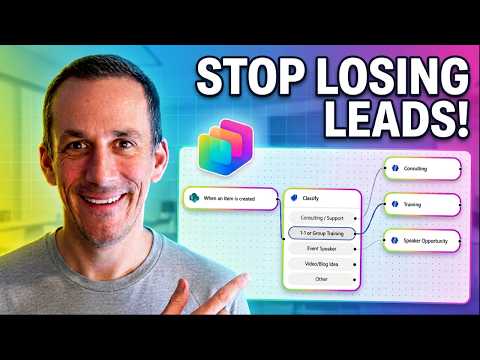
- Trigger on submit: The technical flow maps form fields, classifies intent, pulls relevant knowledge, generates a response, and sends the reply immediately when the user clicks submit.
- Testing: Test the live inbound lead system, iterate prompts and classification rules, and validate responses before publishing to ensure accuracy and fast replies.
- Templates: Start from templates or natural-language descriptions to speed setup, then refine prompts, knowledge sources, and monitoring to scale the solution safely and reliably.
Video summary and context
Damien Bird’s YouTube walkthrough, titled Build an Inbound Agent That Responds in Seconds with Copilot Studio, demonstrates how to connect a website contact form to an AI-driven responder that delivers near-instant replies. In clear, step-by-step segments the video promises a working inbound response system in under ten minutes, and it highlights concrete milestones such as building the workflow, setting up intelligent classification, linking knowledge sources, and testing a live inbound lead flow. As a result, the guide targets teams that want to reduce manual intake work and increase responsiveness while using Microsoft tools. Therefore, the video serves both newcomers who want a fast start and experienced practitioners who want a practical blueprint.
How the inbound agent works
First, Bird explains the core idea of an Inbound Agent: an automated endpoint that receives form submissions and issues immediate replies based on configured instructions and connected knowledge. Next, he outlines the technical pieces you need, including triggers that fire on form submit, mapping of form fields into the agent’s inputs, and response templates shaped by prompts and knowledge sources. Moreover, he emphasizes the role of testing and publishing so teams can validate correctness before routing live leads into production. Consequently, this structure prioritizes speed of response while keeping the configuration transparent and testable.
Technical setup and configuration
In the demonstration, Bird walks viewers through creating the flow inside Copilot Studio, showing how to define instructions and attach relevant content sources such as files and internal documentation. Then, he adds an intelligent classification step so the agent can route or tailor responses depending on the inquiry type, which reduces false or generic replies. He also shows how to add capabilities and prompts that shape tone, required actions, and escalation rules, and he stresses the importance of a proper mapping layer between the website form and the agent’s input model. Ultimately, the sequence of create, build, test, publish, and monitor offers a lifecycle that supports iterative improvement.
Benefits, tradeoffs, and practical choices
On the plus side, automation delivers faster response times and consistent handling of routine inquiries, which improves lead capture and customer perception. However, there are notable tradeoffs: prioritizing speed can reduce depth if the agent relies solely on canned responses, and heavier customization in Copilot Studio raises development and maintenance costs. Additionally, Microsoft’s simpler Agent Builder in Microsoft 365 Copilot can get teams running quickly with templates, but it sacrifices the advanced controls and monitoring that Copilot Studio provides. Therefore, teams must balance the desire for rapid deployment against needs for accuracy, oversight, and scale.
Challenges and best practices
One common challenge is classification accuracy: automatic routing can mislabel nuanced messages, which increases the risk of incorrect or unhelpful responses. To address this, Bird recommends iterative testing with real submissions, and adding a human-in-the-loop fallback for edge cases, so that unusual or high-value leads receive human review. Furthermore, organizations must account for privacy, security, and compliance, which means limiting sensitive data exposure and logging access carefully while also managing API limits and latency. In short, a pragmatic mix of automation, supervision, and monitoring yields the best tradeoff between speed and safety.
Testing, deployment and monitoring
Finally, the tutorial closes by demonstrating a live test of the inbound lead system, showing how simulated submissions flow through the agent and how to refine triggers and prompts based on observed behavior. After deployment, Bird points out that monitoring usage metrics and conversation logs helps teams find failure modes and opportunities to expand the agent’s knowledge base. Consequently, an operational plan that includes staged rollout, logging, and regular reviews will keep the agent accurate and responsive as query patterns evolve. Thus, maintenance and ongoing tuning are essential parts of delivering the promised “responds in seconds” experience.
Overall, Damien Bird’s video offers a compact and actionable guide to building an automated inbound response system with Copilot Studio. While it shows how to rapidly reduce manual work, the video also highlights necessary tradeoffs and the ongoing effort needed to keep automated responders reliable and compliant. For teams considering this route, the path is clear: start with templates or a simple agent to prove value, then invest in customization, governance, and monitoring to scale safely and effectively.

Keywords
Copilot Studio inbound agent, build inbound agent with Copilot Studio, Copilot Studio real-time customer support, fast-response chatbot Copilot Studio, AI customer service Copilot Studio, inbound agent responds in seconds, Microsoft Copilot Studio tutorial, automated customer support Copilot