- All of Microsoft
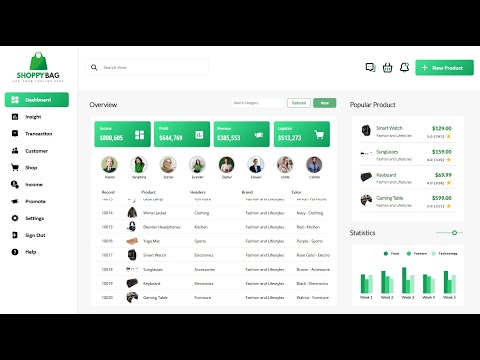
PowerApps: Unlock the Potential of Your ECommerce Dashboard UI
Welcome to the channel dedicated to #PowerBIDesign and #DAX tutorials! Join us as we explore the world of data visualization, guiding you through the process of creating stunning dashboards
ECommerce Dashboard UI in PowerApps step-by-step tutorial design best practices interactive filters Microsoft PowerApps
Key insights
- PowerApps is a versatile tool within the Microsoft Power Platform, enabling users to create custom business applications with a low-code approach, using features like drag-and-drop interfaces and pre-built templates.
- The ECommerce Dashboard UI in PowerApps helps businesses manage ecommerce operations by tracking sales, monitoring inventory, and analyzing customer behavior through user-friendly, data-driven interfaces.
- Drag-and-Drop Interface: Developers can create applications easily by dragging controls onto a canvas, allowing complex ecommerce dashboards to be built without extensive coding knowledge.
- Data Integration: PowerApps connects to various data sources like databases and Excel sheets, crucial for real-time data needs in ecommerce dashboards.
- The platform supports low-code development, seamless integration with the Microsoft ecosystem, AI and analytics capabilities via AI Builder, and offers customization for specific ecommerce requirements.
- Recent updates include React and Fluent-based virtual code components for consistent styling and improved performance. New tools like the Plan Designer simplify transforming business requirements into solutions with minimal technical expertise.
ECommerce Dashboard UI in PowerApps: A Comprehensive Overview
In a recent YouTube video by Power BI Professionals, viewers are guided through the creation of an engaging ECommerce Dashboard UI using Microsoft PowerApps. The tutorial, titled "ECommerce Dashboard UI in PowerApps - Part 1," provides step-by-step instructions for building a responsive and visually appealing dashboard. This article summarizes the key insights from the video, highlighting the technology's features, advantages, and recent updates, while also addressing the challenges and tradeoffs involved.
Introduction to PowerApps ECommerce Dashboard UI
Initially, the video introduces PowerApps as a robust tool within Microsoft's Power Platform, designed to simplify application development through a low-code approach. PowerApps allows users to create custom business applications efficiently, even without extensive coding experience. It offers intuitive drag-and-drop interfaces, ready-to-use templates, and seamless integration with various data sources. Although traditionally recognized for internal business applications, PowerApps proves highly effective for developing sophisticated ecommerce dashboards.
In the tutorial, the presenter demonstrates how to build a clean and responsive ECommerce Dashboard UI screen. The video outlines specific steps, including designing menus, headers, and interactive cards, making it easier for businesses to manage and analyze ecommerce operations such as sales tracking, inventory management, and customer behavior analysis.
Understanding the Basics of PowerApps Technology
To further clarify the technology, the video highlights several foundational aspects of PowerApps. Firstly, the drag-and-drop interface simplifies the creation of complex dashboards. Users can easily place controls like charts, galleries, and forms onto a canvas, significantly reducing the need for extensive coding knowledge. However, this ease of use may sometimes limit the flexibility for more advanced customizations, presenting a tradeoff between simplicity and complexity.
Additionally, PowerApps provides a variety of pre-built templates designed for different industries and functions. While specific ecommerce templates might not be extensively available, existing templates can be adapted effectively to meet ecommerce requirements. This adaptability saves valuable development time, but businesses must carefully balance template convenience against the need for specific customizations.
Another crucial aspect highlighted in the video is data integration. PowerApps excels in connecting to diverse data sources, including databases, Excel sheets, and external APIs. This capability is particularly valuable for ecommerce dashboards, which often require real-time data from multiple platforms. Nevertheless, integrating multiple data sources can pose challenges in maintaining data consistency and performance optimization, requiring careful planning and management.
Advantages of Implementing PowerApps for Ecommerce Dashboards
The video emphasizes several significant advantages of using PowerApps to create ecommerce dashboards. One notable benefit is its low-code development environment, which empowers businesses to develop sophisticated dashboards without needing extensive coding expertise. This advantage significantly lowers the barrier to entry, allowing smaller businesses or teams with limited technical resources to leverage advanced analytics capabilities.
Another advantage is PowerApps' seamless integration with the Microsoft ecosystem. Businesses already utilizing Microsoft tools such as Excel, Dynamics, or Office applications will find PowerApps particularly beneficial. This integration simplifies data collection, processing, and visualization across departments, enhancing operational efficiency and collaboration.
Furthermore, the platform offers robust AI and analytics capabilities through its AI Builder feature. This functionality enables businesses to incorporate advanced analytics into their dashboards, such as predicting sales trends or identifying customer preferences. However, integrating AI-driven features requires careful consideration of data quality and accuracy to ensure reliable insights.
Lastly, PowerApps provides extensive customization and flexibility, allowing businesses to tailor dashboards specifically to their ecommerce needs. Users can design interfaces aligned with their brand identity and integrate specific workflows or automation processes. While customization enhances user experience, it also demands careful planning to avoid overly complex designs that could negatively impact usability and performance.
Exploring Recent Updates and Innovations
The video also sheds light on recent updates and innovations within PowerApps, enhancing its capabilities for ecommerce dashboard development. Notably, the introduction of React and Fluent-based virtual code components significantly improves the development experience. These components offer consistent styling and better performance across applications, facilitating smoother user interactions and more professional-looking dashboards.
Additionally, the integration of Power Automate and AI-powered development tools further expands the possibilities for businesses. Power Automate enables efficient workflow automation, streamlining processes and reducing manual intervention. Meanwhile, AI-driven tools provide deeper insights and predictive analytics, empowering businesses to make data-informed decisions proactively.
Another important innovation discussed is the Plan Designer, currently available in public preview. This tool simplifies translating business requirements into practical low-code solutions. Combined with the enhanced AI capabilities and improved data workspace features, Plan Designer allows users to create intelligent and impactful ecommerce dashboards with minimal technical expertise. However, businesses must evaluate the stability and maturity of these new tools before fully integrating them into critical operations.
Challenges and Considerations in Adopting PowerApps
While the video highlights numerous benefits and innovations, it also acknowledges certain challenges and considerations when adopting PowerApps for ecommerce dashboards. One primary challenge involves balancing simplicity and complexity. While low-code development simplifies application creation, it may limit advanced functionalities required by larger enterprises or highly specialized ecommerce operations.
Moreover, data integration, although powerful, can present challenges in terms of performance optimization and data consistency. Businesses must carefully manage connections to multiple data sources to maintain dashboard responsiveness and reliability. Additionally, incorporating AI-driven analytics demands high-quality data inputs, making data governance and quality assurance critical concerns.
Lastly, while recent updates offer exciting new features, businesses should consider the potential risks associated with adopting new technologies still in preview or early release stages. Evaluating the maturity and stability of these innovations is essential to avoid disruptions or unexpected issues in production environments.
Conclusion and Future Outlook
In conclusion, the YouTube tutorial by Power BI Professionals effectively demonstrates the potential of PowerApps for creating dynamic and responsive ecommerce dashboards. The platform's low-code approach, robust integration capabilities, and recent innovations offer significant advantages for businesses seeking efficient and insightful dashboard solutions. However, careful consideration of tradeoffs, challenges, and the maturity of new features is essential for successful implementation.
As PowerApps continues to evolve, businesses can expect further enhancements in usability, performance, and AI-driven analytics. Staying informed about these developments will enable organizations to maximize the benefits of PowerApps, driving greater efficiency and informed decision-making in their ecommerce operations.
Keywords
ECommerce Dashboard, PowerApps UI, ECommerce Analytics, PowerApps Design, Dashboard Interface, ECommerce Insights, User Interface Design, Power Platform Tools