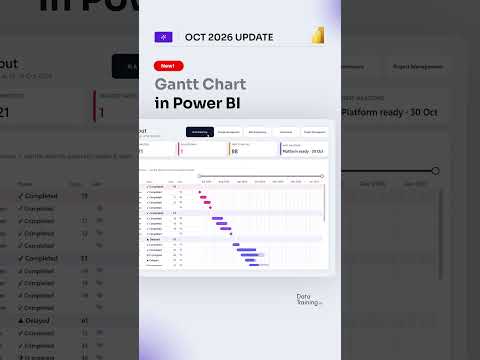
Power BI native Gantt chart gets a first look
How to Power BI highlights a native Gantt visual, giving report authors a way to show task schedules and progress without importing a separate visual.
Key insights
- The native Gantt visual is described in the research notes as a Power BI preview feature.
- Task labels are required; start and end dates create duration bars.
- A start date with no end date can represent a milestone.
- The visual supports up to three levels of grouping and a maximum of 1,000 rows.
- The documented feature set does not include dependency management, critical-path analysis or baselines.
How to Power BI published a 14-second YouTube Short titled “New! Native Gantt Chart in Power BI in action :)”. The supplied Short description contains no transcript or further detail, so the clip’s exact on-screen demonstration cannot be confirmed here. The accompanying research notes describe a native Gantt visual in preview: it brings basic schedule reporting into Power BI, while leaving advanced project controls unclear or outside the documented feature set.
What's new
A Gantt chart displays tasks as horizontal bars along a time axis, making start dates, end dates and durations visible together. The research notes describe the Power BI visual as a core visual in preview, rather than a separate visual imported from AppSource. They list task labels, progress indicators, milestones, task-detail columns, tooltip fields and a zoomable timeline among its capabilities.
The notes also say the visual can group tasks across as many as three category levels and display up to 1,000 rows. Those details offer a useful sense of its intended scope, but the Short’s supplied description does not independently confirm which capabilities appear in the clip.
Why it matters
For report authors, a built-in option could reduce dependence on a separately installed Gantt visual for straightforward timelines. Project and operations teams could view schedules alongside other Power BI report content, such as KPIs or tables, according to the research notes. This is most relevant when the goal is to communicate timing and progress in an analytical report, not to replace a full project-management system.
Because the visual is described as preview, teams should treat its capabilities as subject to change. The notes do not specify licensing requirements, rollout timing or availability by tenant, region or Power BI version. Readers working with Power BI can use the visual’s stated scope to decide whether to test it against their reporting needs.
How it works
The research notes describe a field-based setup. Add a task label first; separate start and end date fields then define the duration bar. A percentage-complete value can show progress, while categories can organize activities into groups such as phases or workstreams.
- Add the Gantt visual to a report.
- Assign a task or activity label.
- Add start and end dates to show duration bars.
- Optionally add progress, grouping categories, task details and tooltip fields.
For a milestone, the notes say to supply a start date and leave the end date blank. A zoomable time axis is also listed, but the supplied Short description does not show the precise interactions or formatting controls.
Limitations and open questions
The research notes identify a 1,000-row ceiling and say advanced dependency management, critical-path analysis and baselines are not included in the documented preview feature set. That limits what can be concluded about suitability for complex project controls. The notes suggest custom visuals or dedicated project-management platforms may still be needed for requirements such as predecessor links, baseline comparisons or resource leveling.
We could not verify the Short’s visual details from its description, nor confirm licensing, availability, or whether the preview has changed since the research notes were compiled. Treat this as a brief pointer to the feature, not a complete product walkthrough.
Sources
Frequently asked questions
Is the native Power BI Gantt visual generally available?
The research notes describe it as a preview feature. They do not state its current availability by tenant, region or license.
What fields are needed for a basic task bar?
A task or activity label is required, and separate start and end dates create a duration bar.
Can the visual handle project dependencies or critical paths?
The research notes say these capabilities are not part of the documented preview feature set.